
Passer au contenu

Panier

Votre panier est vide

Article: How to check my Mac address (Hardware address) ?

How to check my Mac address (Hardware address) ?

7.1. Firstly power on the mini PC and enter Ubuntu system --> click mouse left key at top right corner of Ubuntu account and choose "System settings..."

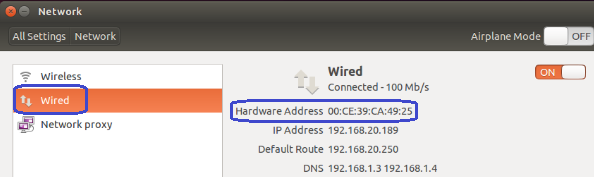
7.2. Double click Network --> Wired --> then we could see the Mac address (Hardware address).
Laisser un commentaire

Този сайт е защитен чрез hCaptcha и се прилагат Правилата за поверителност и Условията за използване на услугата на hCaptcha.

Tous les commentaires sont modérés avant d'être publiés.

Read more

How to change User Accounts ?

How to change User Accounts ?

8.1. Firstly power on the mini PC and enter Ubuntu system --> click mouse left key at top right corner of Ubuntu account and choose "System settings..." 8.2. Double click User Accounts --> U...

En savoir plus
How to change User Accounts ?

How to change User Accounts ?

8.1. Firstly power on the mini PC and enter Ubuntu system --> click mouse left key at top right corner of Ubuntu account and choose "System settings..." 8.2. Double click User Accounts --> U...

En savoir plus