
Zum Inhalt springen

Warenkorb

Dein Warenkorb ist leer

Artikel: How to add a display language?

How to add a display language?

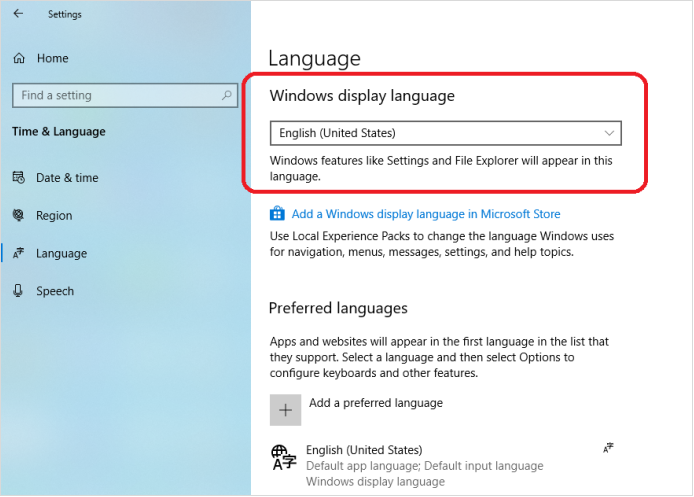
Step1, Click Right mouse on the Windows icon on the bottom left corner-> Select Settings->Time & Language->Language->Click Add a preferred language to add a display language.

Step2, Choose a language to install.

Step3, Choose the install language features. 

Step4, If you forget to check Set as my display language , you can change the preferred display language for windows here.

Hinterlasse einen Kommentar

Diese Website ist durch hCaptcha geschützt und es gelten die allgemeinen Geschäftsbedingungen und Datenschutzbestimmungen von hCaptcha.

Alle Kommentare werden vor der Veröffentlichung geprüft.

Read more

How to change the display size of screen content to fit the TV screen?

How to change the display size of screen content to fit the TV screen?

Open the Intel® Graphics Command Center, click Connected Displays ->Scale->Select Custom, change the display size of screen content to fit the TV screen. 

Weiterlesen
How to change the display size of screen content to fit the TV screen?

How to change the display size of screen content to fit the TV screen?

Open the Intel® Graphics Command Center, click Connected Displays ->Scale->Select Custom, change the display size of screen content to fit the TV screen. 

Weiterlesen