Zum Inhalt springen

Warenkorb

Dein Warenkorb ist leer

Artikel: How to install device driver(.inf)on Mini PC?

How to install device driver(.inf)on Mini PC?

1. Press the Windows key + R key on the keyboard.

2. In the Run dialog box, type devmgmt.msc and press the Enter key.

3. In Device Manager, locate the device that needs a driver install.

4. Right-click the device's name or icon and select Update driver.

5.Select Browse my computer for drivers.
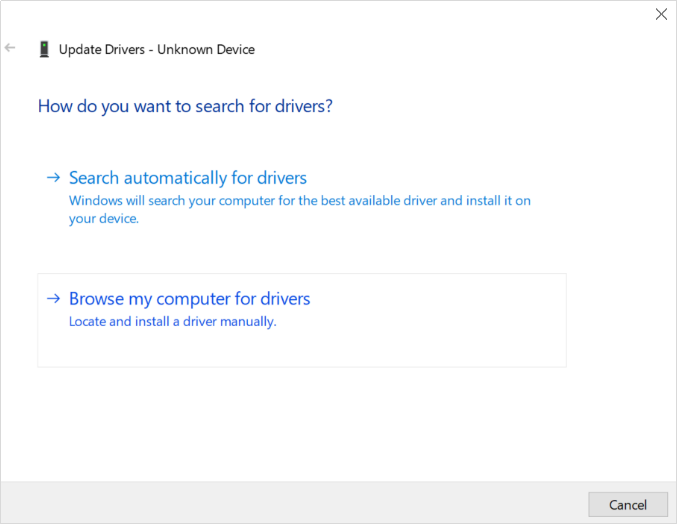
6.Click Browse, select the location of drivers.

7.Click Next to confirm and proceed with driver install.

8. Click Close.

9. Some drivers need to restart the PC to make them work.

 

Hinterlasse einen Kommentar

Diese Website ist durch hCaptcha geschützt und es gelten die allgemeinen Geschäftsbedingungen und Datenschutzbestimmungen von hCaptcha.

Alle Kommentare werden vor der Veröffentlichung geprüft.

Read more

How do I roll back a driver to a previous version?

How do I roll back a driver to a previous version?

The rollback driver feature available in Windows Device Manager is used to uninstall the current driver and then automatically install the previously installed version of the driver. The most commo...

Weiterlesen
How to update to Windows 11?

How to update to Windows 11?

PCG02 GLK\PCG02 GLE\Quieter2\PCG35 GLK\PCG35 GML4GB+64GB or higher configuration are able to be upgraded to Win11 . PCG02 APL\PCG02 APO are unable to support Win11. If you are not sure whether your...

Weiterlesen