Ir al contenido

Cesta

La cesta está vacía

Artículo: How to check my Mac address (Hardware address) ?

How to check my Mac address (Hardware address) ?

7.1. Firstly power on the mini PC and enter Ubuntu system --> click mouse left key at top right corner of Ubuntu account and choose "System settings..."

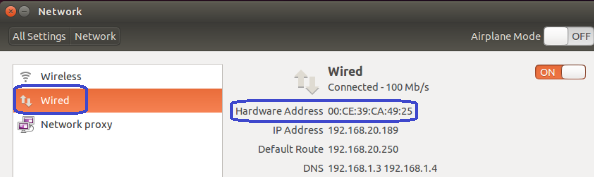
7.2. Double click Network --> Wired --> then we could see the Mac address (Hardware address).
Dejar un comentario

Este sitio está protegido por hCaptcha y se aplican la Política de privacidad de hCaptcha y los Términos del servicio.

Todos los comentarios se revisan antes de su publicación.

Read more

How to change User Accounts ?

How to change User Accounts ?

8.1. Firstly power on the mini PC and enter Ubuntu system --> click mouse left key at top right corner of Ubuntu account and choose "System settings..." 8.2. Double click User Accounts --> U...

Leer más
How to change User Accounts ?

How to change User Accounts ?

8.1. Firstly power on the mini PC and enter Ubuntu system --> click mouse left key at top right corner of Ubuntu account and choose "System settings..." 8.2. Double click User Accounts --> U...

Leer más