Hoppa till innehållet

Varukorg

Din varukorg är tom

Artikel: How to check my Mac address (Hardware address) ?

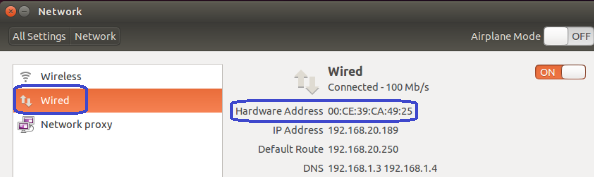
How to check my Mac address (Hardware address) ?

7.1. Firstly power on the mini PC and enter Ubuntu system --> click mouse left key at top right corner of Ubuntu account and choose "System settings..."

7.2. Double click Network --> Wired --> then we could see the Mac address (Hardware address).
Lämna en kommentar

Denna webbplats är skyddad av hCaptcha och hCaptchas integritetspolicy . Användarvillkor gäller.

Alla kommentarer modereras innan de publiceras.

Read more

How to change User Accounts ?

How to change User Accounts ?

8.1. Firstly power on the mini PC and enter Ubuntu system --> click mouse left key at top right corner of Ubuntu account and choose "System settings..." 8.2. Double click User Accounts --> U...

Läs mer
How to change User Accounts ?

How to change User Accounts ?

8.1. Firstly power on the mini PC and enter Ubuntu system --> click mouse left key at top right corner of Ubuntu account and choose "System settings..." 8.2. Double click User Accounts --> U...

Läs mer