
Passer au contenu

Panier

Votre panier est vide

Article: How to add a display language?

How to add a display language?

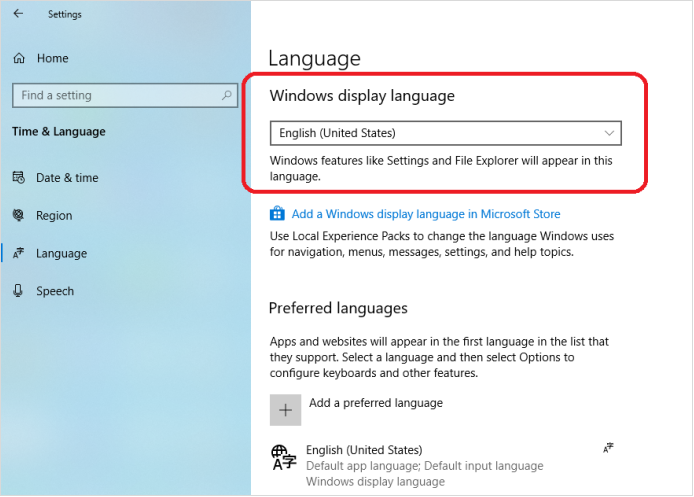
Step1, Click Right mouse on the Windows icon on the bottom left corner-> Select Settings->Time & Language->Language->Click Add a preferred language to add a display language.

Step2, Choose a language to install.

Step3, Choose the install language features. 

Step4, If you forget to check Set as my display language , you can change the preferred display language for windows here.

Laisser un commentaire

Ce site est protégé par hCaptcha, et la Politique de confidentialité et les Conditions de service de hCaptcha s’appliquent.

Tous les commentaires sont modérés avant d'être publiés.

Read more

How to change the display size of screen content to fit the TV screen?

How to change the display size of screen content to fit the TV screen?

Open the Intel® Graphics Command Center, click Connected Displays ->Scale->Select Custom, change the display size of screen content to fit the TV screen. 

En savoir plus
How to change the display size of screen content to fit the TV screen?

How to change the display size of screen content to fit the TV screen?

Open the Intel® Graphics Command Center, click Connected Displays ->Scale->Select Custom, change the display size of screen content to fit the TV screen. 

En savoir plus