Passer au contenu

Panier

Votre panier est vide

Article: How to check my Mac address (Hardware address) ?

How to check my Mac address (Hardware address) ?

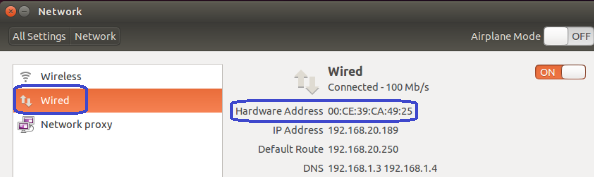
7.1. Firstly power on the mini PC and enter Ubuntu system --> click mouse left key at top right corner of Ubuntu account and choose "System settings..."

7.2. Double click Network --> Wired --> then we could see the Mac address (Hardware address).
Laisser un commentaire

Ce site est protégé par hCaptcha, et la Politique de confidentialité et les Conditions de service de hCaptcha s’appliquent.

Tous les commentaires sont modérés avant d'être publiés.

Read more

How to change User Accounts ?

How to change User Accounts ?

8.1. Firstly power on the mini PC and enter Ubuntu system --> click mouse left key at top right corner of Ubuntu account and choose "System settings..." 8.2. Double click User Accounts --> U...

En savoir plus
How to change User Accounts ?

How to change User Accounts ?

8.1. Firstly power on the mini PC and enter Ubuntu system --> click mouse left key at top right corner of Ubuntu account and choose "System settings..." 8.2. Double click User Accounts --> U...

En savoir plus