Przejdź do treści

Koszyk

Twój koszyk jest pusty

Artykuł: How to check my Mac address (Hardware address) ?

How to check my Mac address (Hardware address) ?

7.1. Firstly power on the mini PC and enter Ubuntu system --> click mouse left key at top right corner of Ubuntu account and choose "System settings..."

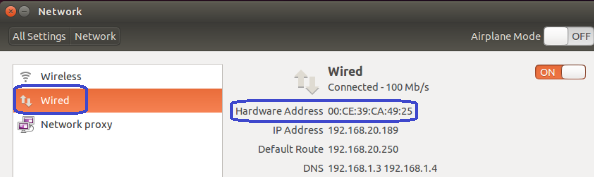
7.2. Double click Network --> Wired --> then we could see the Mac address (Hardware address).
Zostaw komentarz

यह साइट hCaptcha से सुरक्षित है और hCaptcha से जुड़ी गोपनीयता नीति और सेवा की शर्तें लागू होती हैं.

Wszystkie komentarze są moderowane przed opublikowaniem.

Read more

How to change User Accounts ?

How to change User Accounts ?

8.1. Firstly power on the mini PC and enter Ubuntu system --> click mouse left key at top right corner of Ubuntu account and choose "System settings..." 8.2. Double click User Accounts --> U...

Czytaj dalej
How to change User Accounts ?

How to change User Accounts ?

8.1. Firstly power on the mini PC and enter Ubuntu system --> click mouse left key at top right corner of Ubuntu account and choose "System settings..." 8.2. Double click User Accounts --> U...

Czytaj dalej