Siirry sisältöön

Ostoskori

Ostoskorisi on tyhjä

Artikkeli: How to check my Mac address (Hardware address) ?

How to check my Mac address (Hardware address) ?

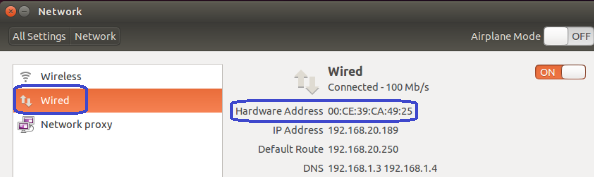
7.1. Firstly power on the mini PC and enter Ubuntu system --> click mouse left key at top right corner of Ubuntu account and choose "System settings..."

7.2. Double click Network --> Wired --> then we could see the Mac address (Hardware address).
Jätä kommentti

Situs ini dilindungi oleh hCaptcha dan berlaku Kebijakan Privasi serta Ketentuan Layanan hCaptcha.

Kaikki kommentit moderoidaan ennen julkaisemista.

Read more

How to change User Accounts ?

How to change User Accounts ?

8.1. Firstly power on the mini PC and enter Ubuntu system --> click mouse left key at top right corner of Ubuntu account and choose "System settings..." 8.2. Double click User Accounts --> U...

Lisätietoja
How to change User Accounts ?

How to change User Accounts ?

8.1. Firstly power on the mini PC and enter Ubuntu system --> click mouse left key at top right corner of Ubuntu account and choose "System settings..." 8.2. Double click User Accounts --> U...

Lisätietoja