Vai al contenuto

Carrello

Il tuo carrello è vuoto

Articolo: How can I disable login screen on wake up?

How can I disable login screen on wake up?

Step 1, Open Local Group Policy Editor. Press WIN+R key->input "gpedit.msc" -> open Local Group Policy Editor.

Step 2, Click Local computer Policy->Administrator Templates->System->Power Management->Sleep Settings.
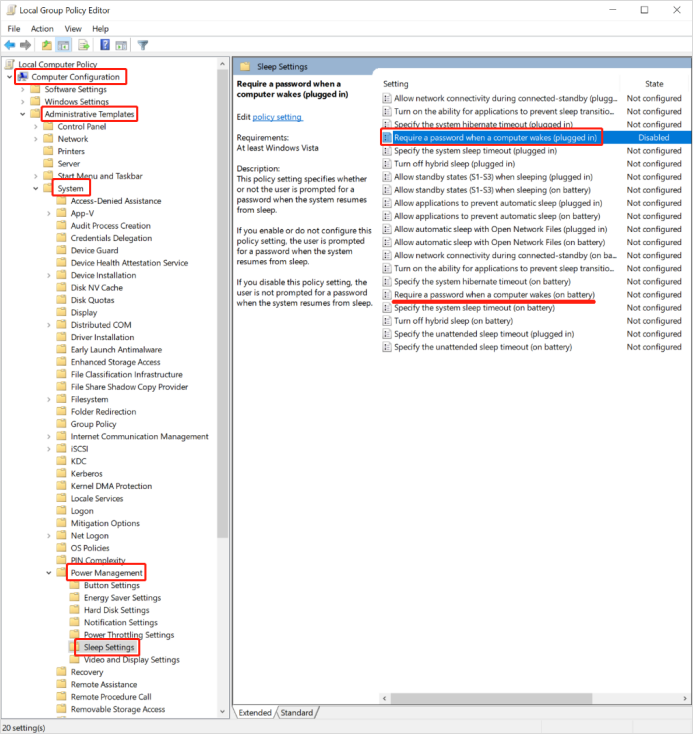
Step 3, Double click "Require a password when a computer wakes(plugged in)" and select "Disabled" . Click Apply and OK to save the changes.
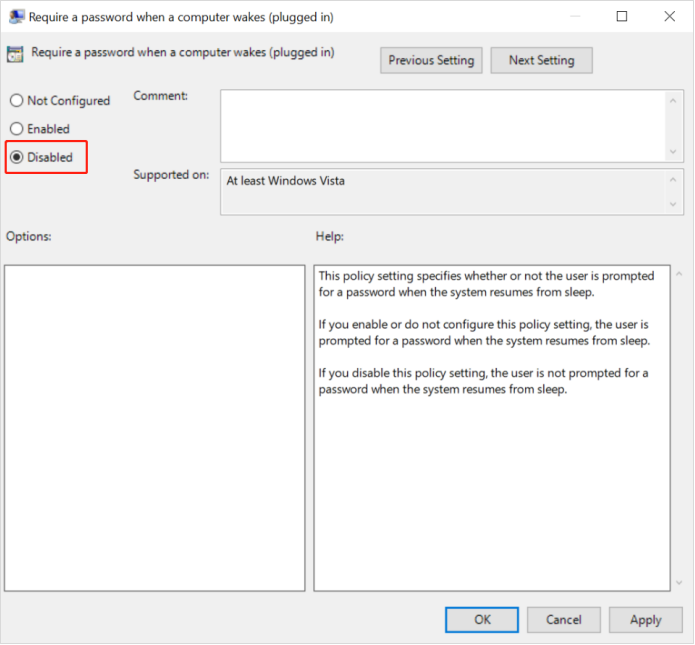
If it does not take effect, restart the computer.

If you need the login screen when a computer wakes, you can change it to "enabled".

Commenta

Questo sito è protetto da hCaptcha e applica le Norme sulla privacy e i Termini di servizio di hCaptcha.

Nota che i commenti devono essere approvati prima di essere pubblicati.

Read more

Windows can't be activated?

Windows can't be activated?

MeLE Mini PC has preinstalled Windows 10 License(Special or customized exceptions.), can support Personalization, Windows Update and reinstall Windows repeatedly. Windows 10 License ID/Product Key ...

Per saperne di più
Why does the computer display capacity not match the nominal capacity?

Why does the computer display capacity not match the nominal capacity?

The factory capacity of flash memory products is calculated as 1MB=1000KB, 1GB=1000MB, and the computer operating system uses binary algorithms, 1MB=1024KB, 1GB=1024MB. So the display capacity of f...

Per saperne di più