Naar inhoud

Winkelwagen

Je winkelwagen is leeg

Artikel: How to check my Mac address (Hardware address) ?

How to check my Mac address (Hardware address) ?

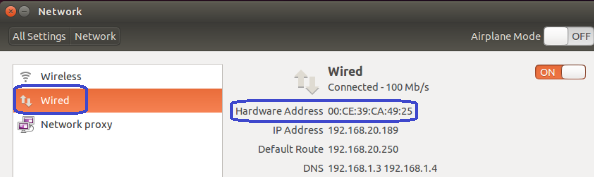
7.1. Firstly power on the mini PC and enter Ubuntu system --> click mouse left key at top right corner of Ubuntu account and choose "System settings..."

7.2. Double click Network --> Wired --> then we could see the Mac address (Hardware address).
Laat een reactie achter

Laman ini dilindungi oleh hCaptcha dan tertakluk pada Dasar Privasi dan Terma Perkhidmatan hCaptcha.

Alle reacties worden gemodereerd voordat ze worden gepubliceerd.

Read more

How to change User Accounts ?

How to change User Accounts ?

8.1. Firstly power on the mini PC and enter Ubuntu system --> click mouse left key at top right corner of Ubuntu account and choose "System settings..." 8.2. Double click User Accounts --> U...

Meer informatie
How to change User Accounts ?

How to change User Accounts ?

8.1. Firstly power on the mini PC and enter Ubuntu system --> click mouse left key at top right corner of Ubuntu account and choose "System settings..." 8.2. Double click User Accounts --> U...

Meer informatie