Przejdź do treści

Koszyk

Twój koszyk jest pusty

Artykuł: How to check my Mac address (Hardware address) ?

How to check my Mac address (Hardware address) ?

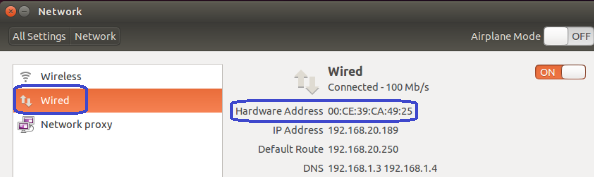
7.1. Firstly power on the mini PC and enter Ubuntu system --> click mouse left key at top right corner of Ubuntu account and choose "System settings..."

7.2. Double click Network --> Wired --> then we could see the Mac address (Hardware address).
Zostaw komentarz

Ta strona jest chroniona przez hCaptcha i obowiązują na niej Polityka prywatności i Warunki korzystania z usługi serwisu hCaptcha.

Wszystkie komentarze są moderowane przed opublikowaniem.

Read more

How to change User Accounts ?

How to change User Accounts ?

8.1. Firstly power on the mini PC and enter Ubuntu system --> click mouse left key at top right corner of Ubuntu account and choose "System settings..." 8.2. Double click User Accounts --> U...

Czytaj dalej
How to change User Accounts ?

How to change User Accounts ?

8.1. Firstly power on the mini PC and enter Ubuntu system --> click mouse left key at top right corner of Ubuntu account and choose "System settings..." 8.2. Double click User Accounts --> U...

Czytaj dalej