
Artikel: How can I disable login screen on wake up?
How can I disable login screen on wake up?
Step 1, Open Local Group Policy Editor. Press WIN+R key->input "gpedit.msc" -> open Local Group Policy Editor.

Step 2, Click Local computer Policy->Administrator Templates->System->Power Management->Sleep Settings.
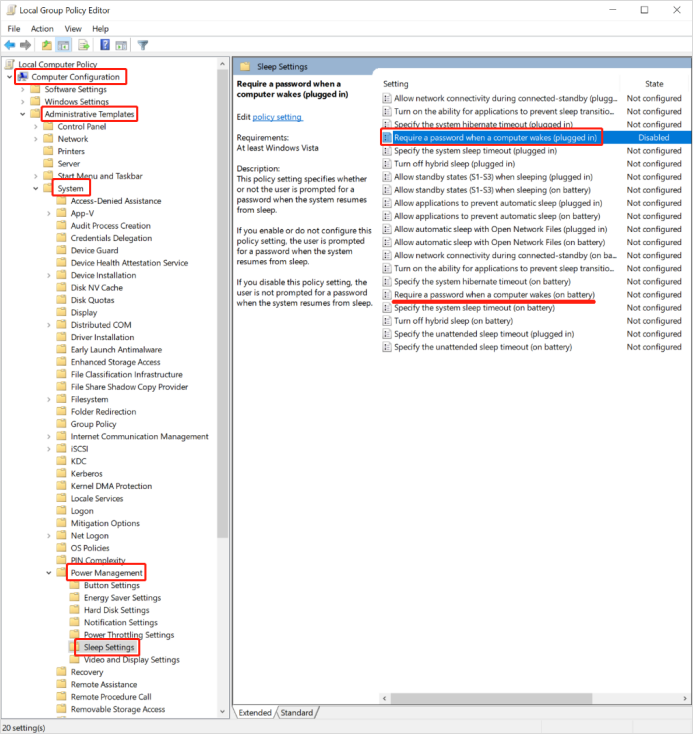
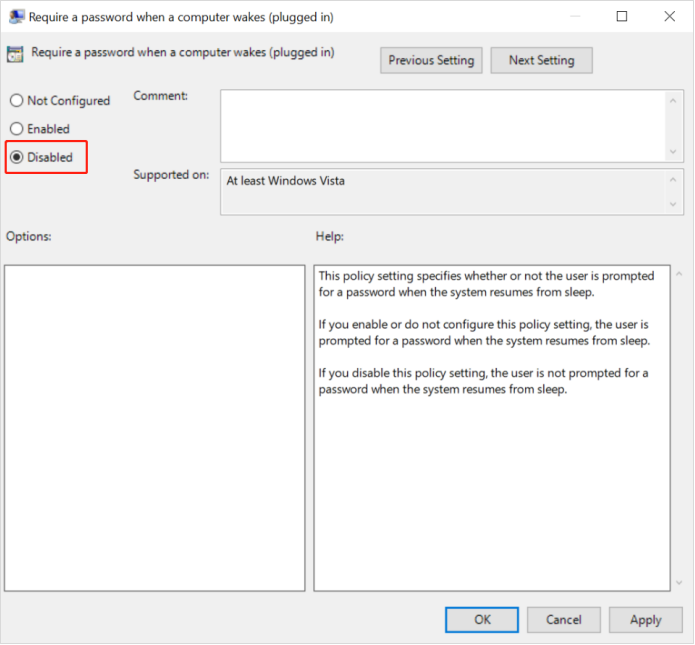
Step 3, Double click "Require a password when a computer wakes(plugged in)" and select "Disabled" . Click Apply and OK to save the changes.
If it does not take effect, restart the computer.
If you need the login screen when a computer wakes, you can change it to "enabled".
If you need the login screen when a computer wakes, you can change it to "enabled".



Lämna en kommentar
Denna webbplats är skyddad av hCaptcha och hCaptchas integritetspolicy . Användarvillkor gäller.