
How to install a hard disk?
Only PCG35 GLK and PCG63 APO can support install a hard disk with SATA interface. Both SATA and SSD hard disk can be supported.
Step 1, Take off the four screws on the Bottom panel to open the Mini PC. And prepare a 2.5'' hard disk with SATA interface. The 2.5'' hard disk will be fixed on the bottom panel.

Step2, Follow the picture to install hard disk and tighten the four screws to fix hard disk on the bottom panel.


Step3, Connect the the power cable and SATA cable.
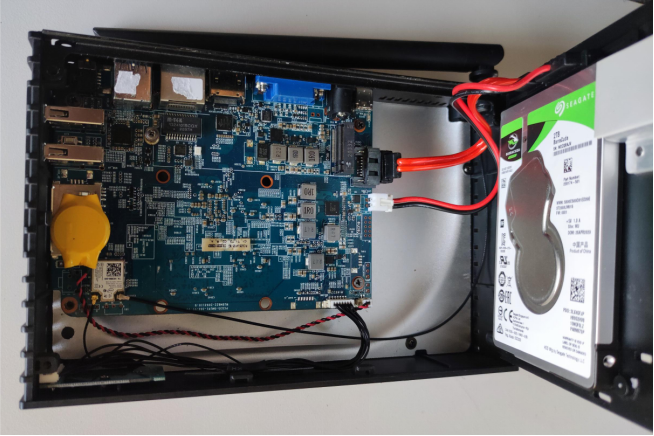
Step4, Install the bottom panel and tighten the screws.


Dejar un comentario
Trang web này được bảo vệ bằng hCaptcha. Ngoài ra, cũng áp dụng Chính sách quyền riêng tư và Điều khoản dịch vụ của hCaptcha.