
What to do if WiFi does not work in Ubuntu?
1.Check if WiFi is available in Windows.
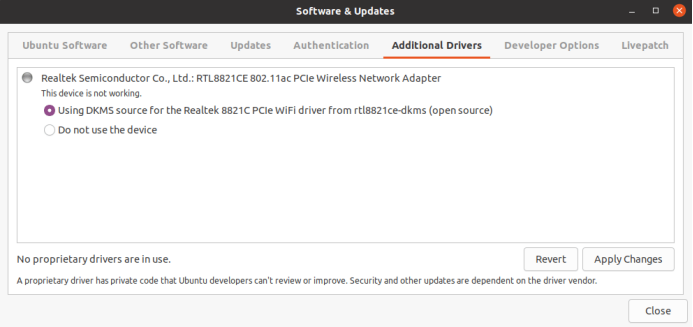
2.If WiFi is Realtek 8821CE,make the WiFi working it is necessary to install an additional driver for the RTL8821CE module provided by Ubuntu’s‘rtl8821ce-dkms’package.
Step1,open software&updates

Step2,Select 'Using DKMS source for the Realtek 8821c PCIe WiFi...' in Additional Drivers, and then click Apply Changes.
Step3, After the installation is complete, restart to use WiFi.



Jätä kommentti
Tämä sivu on suojattu hCaptcha-tunnistuksella, ja hCaptchan tietosuojakäytäntöjä ja käyttöehtoja sovelletaan.